


Sandbox Powder Alchemy Element
4.7821.00 Reviews
App Specs
- Version
- 2.2.9
- Updated On
- License
- Free
- Downloads
- 5,000,000+
- Developer
- INWAVE GLOBAL
- Categories
- Simulation
- Platform
- Android
Screenshots
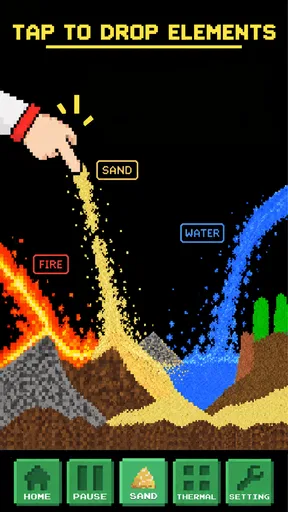
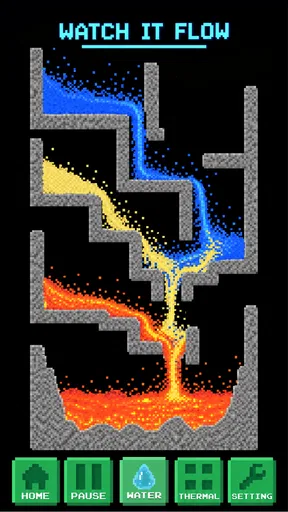
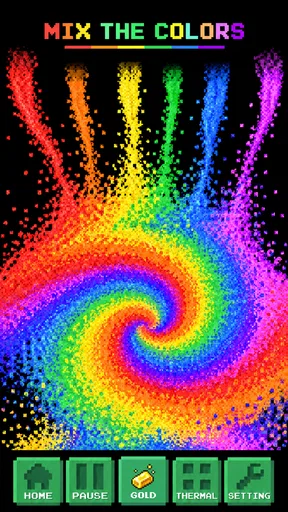
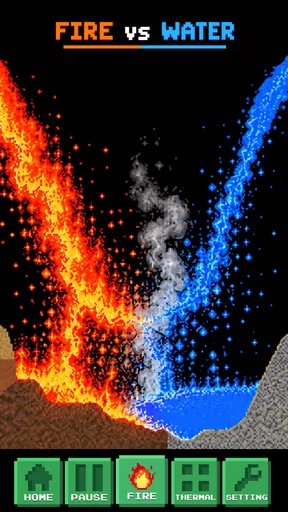
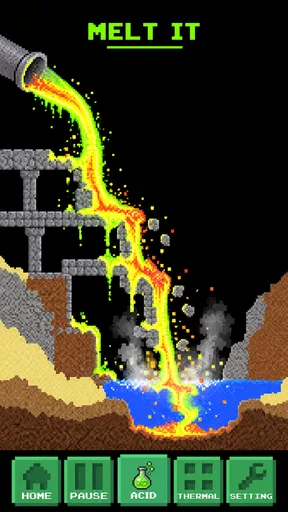
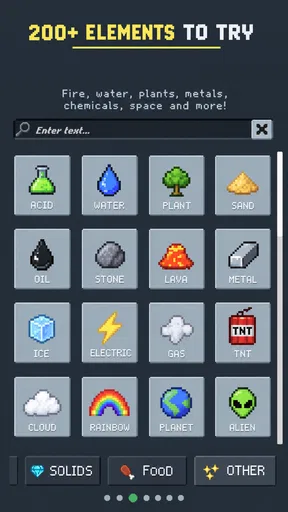
 Analysis by AppCompare
I like the idea of a science toy that lets you make a mess without needing a sink, and that is the appeal of Sandbox Powder Alchemy Element. This is a free simulation game from INWAVE GLOBAL, built around experimenting with powder-like elements and watching what happens when they meet. It can suit a curious child, a casual player, or anyone who enjoys open-ended tinkering more than chasing levels. My main reservation is that a free-form sandbox asks you to supply your own goals: if you want guided lessons, clear objectives, or fast-paced challenges, it may not hold your attention for long.
Finding your way around the canvas
When you first open Sandbox Powder Alchemy Element, you’re greeted with a simple interface, which is exactly what you want when you're about to dive into the world of alchemy. The layout is straightforward, with a palette of elements on one side and your canvas on the other. The app lets you get right into the action without any unnecessary fuss.
That direct layout is useful on a small screen: the palette gives you materials to choose from, while the open canvas makes the experiment itself the focus. I would start with a single element, place a modest amount, and then add a second nearby rather than filling the screen straight away. It is easier to see what caused a reaction when you change one thing at a time. That small habit turns aimless tapping into a more satisfying test, especially when you are trying to understand why one arrangement behaves differently from another.
The game is rated Everyone, so it is broadly suitable for a family audience, though I would still treat it as a playful introduction rather than a substitute for a science lesson. Its average rating is 4.6 from around 78,000 ratings, and it has passed five million installs. Those figures suggest that the simple sandbox idea has found a sizeable audience, but they do not mean every player will enjoy an open-ended format. I think it works best when you are happy to learn by trying things instead of being told exactly what to do.
Experimenting without a fixed route
The app is designed for both casual users and those who want to experiment in depth. You can start by selecting basic elements like water, fire, and earth. Drag them onto the canvas and watch the magic unfold. The interactions are surprisingly realistic and quite satisfying. For instance, combine water and fire, and you'll see steam rising. It's these little details that make the app so engaging.
Once you've got the hang of the basics, it's time to dig deeper. The app offers a plethora of elements to play with, each with unique properties. This isn’t just about mixing water and fire; think outside the box. You can experiment with more complex reactions, like creating explosions or growing plants. The possibilities are endless, and it feels like there’s always something new to discover.
For a more deliberate session, I would treat the canvas like a tiny test bench: make a simple setup, observe it, then reset or change one part before trying again. If a scene becomes crowded, start a fresh arrangement instead of adding yet another material on top; it is easier to compare outcomes when the canvas is not already busy. This is also a handy way to make the game work for different attention spans. A quick trial can fill a few spare minutes, while a longer session can become a chain of small questions about cause and effect.
Worth Reading Before You Choose

EA SPORTS FC Mobile 26 Is a Bigger Football Game, but It Takes Time

Flipboard Shows What News Apps Must Do Beyond the Feed

Switching to Android Auto Means Rethinking Your Driving Routine

Google Calendar Makes a Crowded Week Easier to Manage

Ludo King Makes the Most of the Minutes Between Plans

Baby Panda World Brings Quick Play to Modern Phones, but Its Game Library Feels Busy
Good for curiosity, less so for instruction
One feature that really stands out is the ability to save your creations. You can store your favorite experiments and come back to them whenever you want, which is perfect for those "aha!" moments when you discover an unexpected reaction. Plus, there’s an option to share your creations with friends, so you can show off your inner alchemist.
Saving is especially useful when you have built a scene you want to revisit rather than reconstruct from scratch. I would use it to keep a few different experiments separate: one for a simple reaction, another for a more elaborate arrangement, and a third as a space for unplanned play. Sharing can also make the game a conversation starter. Instead of just saying that a combination was interesting, you can show someone what you made and invite them to suggest the next test. I would not assume that sharing turns the game into a social network; its value here is simply giving your experiments an audience.
Now, let's talk about why you should download this app. First off, it’s just plain fun. There’s something genuinely entertaining about watching elements react to one another. It’s a mix of relaxation and fascination as you create miniature worlds and watch them evolve.
Moreover, the app is educational without being overtly so. You’re learning about elements and their reactions, but it doesn’t feel like a chore. It’s a great way to spark curiosity, especially for kids or anyone interested in science. The app makes you feel like a modern-day wizard, conjuring up reactions with a simple swipe of your finger.
For a realistic everyday use, I can imagine opening it while waiting for food to cook or during a quiet break, choosing two materials and seeing how a small arrangement changes. It is an easy kind of play to stop and return to, particularly if you save a setup you want to show a friend or child later. For a child, I would frame it with a simple prompt—“What do you think will happen if we place these close together?”—then let them try and explain what they noticed. That encourages observation without pretending the game is a complete course in physics or chemistry.
Compared with a conventional puzzle game, this sandbox gives you fewer explicit goals and more freedom to decide what counts as an interesting result. Compared with a structured educational app, it puts experimentation ahead of explanations and lessons. That trade-off is the point: I would choose it for relaxed discovery and visual cause-and-effect, but choose a guided learning tool when I need definitions, a planned sequence, or a reliable way to check scientific understanding.
Comfort, control, and when to pause
Because the main activity involves selecting materials and placing them on a canvas, the experience depends on being able to make touch input comfortably. I would take a moment to check that the controls feel manageable on your device before settling into a long session. If precise dragging is tiring or difficult, a free-form game can become frustrating even when the idea is appealing. Short experiments, with a pause between them, are a sensible way to see whether the interaction suits you.
The visual activity may also matter to players who are sensitive to busy motion or changing scenes. I would begin with a sparse experiment and add complexity gradually, rather than starting with a crowded canvas. That makes it easier to follow what is happening and gives you a natural stopping point if the screen becomes too much. A parent playing alongside a child can also help keep the session calm by choosing one question at a time rather than turning every experiment into a race to create the biggest reaction.
Situationally, it is a better fit for a relaxed moment when you can look at the screen than for listening-only use or a situation where your attention must stay elsewhere. It can be an appealing shared activity at home: one person proposes a combination, another places the materials, and both watch the outcome. I would avoid using it while walking or doing anything that needs your eyes and hands, since the central pleasure is following the changes on the canvas.
Where the sandbox can feel rough
Of course, no app is perfect, and there are a few areas where Sandbox Powder Alchemy Element could improve. While the interface is user-friendly, a tutorial mode would be a welcome addition for first-time users. It can be a bit overwhelming to dive right in without any guidance.
That lack of an obvious first route is more important for some players than others. A person who enjoys experimenting can make their own starting point, but someone who expects a sequence of tasks may wonder what to do after the first few tests. I would not recommend it as the only activity for a child who needs step-by-step teaching, nor for a player who finds open-ended choices stressful. In those cases, a guided science activity or a goal-based puzzle game is likely to be a better fit.
Additionally, while the app performs well most of the time, there can be occasional lags when dealing with complex reactions. This doesn’t happen often, but it can take you out of the experience momentarily. An update to optimize performance would be appreciated.
When the canvas gets complicated, I would keep the experiment focused and avoid treating every slowdown as a sign that the whole game is unusable. A smaller setup is easier to read and may be more comfortable to manage, while elaborate scenes are best approached as occasional projects rather than the default way to play. The current version is 2.2.9, and the game runs on Android 6.0 or later. It is free to start, with optional in-app purchases ranging from $0.99 to $19.99 per item, so I would check purchase prompts before handing the device to a child.
The practical questions are fairly simple: can you play without paying, is it suitable for younger players, and does it require a long session to be worthwhile? The game is free, carries an Everyone age rating, and can be approached in brief experiments, so it can fit casual play. Its optional purchases are worth keeping in mind, particularly on a shared family device. The bigger question is whether you enjoy making your own goals; if you need tutorials, detailed explanations, or a steady progression of challenges, the open sandbox may feel thin.
A playful tool for the right kind of curiosity
In the end, Sandbox Powder Alchemy Element is a delightful app that brings the joy of experimentation to your fingertips. It’s perfect for those times when you need a break from reality and want to indulge in a bit of creative play. Whether you're a science enthusiast or just looking for a new way to pass the time, this app is worth a download.
So, go ahead, ignite your curiosity and see what creations you can come up with. Who knows, you might just discover the next big thing in the world of digital alchemy!
I would recommend it to someone who likes to poke at a system, notice a reaction, and then try one more variation. It is less convincing for someone seeking a polished lesson plan or a game that always tells them what to do next. That distinction is the clearest way to decide: choose this for casual, visual experimentation, and look elsewhere when structure, detailed instruction, or highly predictable performance matters more. For the right player, its loose format is not a flaw to overcome but the reason to keep returning to the canvas.
Pros
- Engaging physics-based gameplay.
- Wide variety of elements to experiment.
- Regular updates with new features.
- Intuitive controls and interface.
- Offline mode available.
Cons
- Ads can be intrusive at times.
- Occasional crashes on older devices.
- Limited tutorials for beginners.
- In-app purchases for advanced features.
- Some UI elements are cluttered.
FAQs for Sandbox Powder Alchemy Element
What is Sandbox Powder Alchemy Element?
Sandbox Powder Alchemy Element is a creative sandbox game where players can experiment with various elements to create unique reactions and scenarios. The game provides a virtual laboratory where you can mix and match elements, observe chemical reactions, and discover new compounds. It's perfect for those who enjoy experimenting and learning through play.
Is Sandbox Powder Alchemy Element suitable for all ages?
Yes, Sandbox Powder Alchemy Element is designed to be family-friendly and suitable for players of all ages. However, younger children might need supervision as the game involves understanding basic chemical reactions. It's an excellent educational tool that can spark interest in science for kids and adults alike.
Does Sandbox Powder Alchemy Element require an internet connection?
No, Sandbox Powder Alchemy Element does not require a constant internet connection to play. You can enjoy the game offline, making it convenient for situations where internet access is limited. However, some features, such as updates or community sharing, might require connectivity.
Are there in-app purchases in Sandbox Powder Alchemy Element?
Yes, Sandbox Powder Alchemy Element offers in-app purchases that can enhance your gaming experience. These may include additional elements, special tools, or cosmetic upgrades. While the game is free to play, these optional purchases can add more depth and customization options.
What platforms is Sandbox Powder Alchemy Element available on?
Sandbox Powder Alchemy Element is available on both Android and iOS platforms. You can download it from the Google Play Store or the Apple App Store. It’s optimized for mobile devices and provides a seamless experience across different screen sizes and operating systems.


